On This Page
Refund
Refund
Refunds are payment refunds from a merchant to the cardholder after a
cardholder pays for a product or service and that payment is captured by the merchant. When a
refund request is successful, the issuer transfers funds from the merchant bank (acquirer)
account to the customer's account. It typically takes 2 to 4 days for the acquirer to transfer
funds from your merchant account.
There are two types of refunds: a
follow-on refund
that is linked to
an original capture or sale, and a stand-alone credit
that is not linked to an original
capture or sale.WARNING
You should carefully control access to your
refund and
credit services. Do not request this service directly from
your customer interface. Instead, incorporate this service as part of your customer service
process. This process reduces the potential for fraudulent transactions.Follow-on Refund
Follow-on Refund
Refunds, also known as
use the capture
request ID to link the refund to the original transaction. follow-on refunds
,This request ID is returned during the capture request (also known as a
The request ID links the transaction to the customer’s billing and account
information, so you are not required to include those fields in the settlement
) and is used in all subsequent refunds associated with the original
capture.refund
request.When you combine a request for a
refund
with a request for another service, such as the tax calculation service, you
must provide the customer’s billing and account information.Unless otherwise specified,
refunds
must be requested within 180 days of a settlement. You can request multiple
follow-on refunds
against a single
capture or sale transaction as long as the total amount does not exceed the original
purchase amount. To perform multiple follow-on refunds
, use the same request ID in each request.Stand-Alone Credits
Stand-alone credits are not connected to an original transaction. Stand-alone credits do
not have a time restriction, and they can be used to issue refunds more than 180 days after
a transaction settlement.
Fast Refunds
Fast refunds enable near real-time refunds by bypassing batch processing for eligible
transactions. Merchants must be enabled for fast refunds in the
Gateway Portal
during
account configuration.Fast refund processing is only available for Visa cards in India.
You can request multiple refunds against a single capture or sale transaction as long as
the total amount does not exceed the original purchase amount.
Fast refunds appear in the
Gateway Portal
as a regular refund. Ineligible refunds
default to standard refund batch processing. For more information about fast refunds, see Fast Refunds.
Refund and Credit Workflow
This workflow applies to follow-on credits, also known as refunds, and stand-alone credits.
It begins when you send a request for a refund or credit.
Refunds and credits do not happen in real time. All of the credit requests for a day are
typically placed in a file and sent to the processor as a single
batch
transaction. In
most cases, the batch transaction is settled overnight.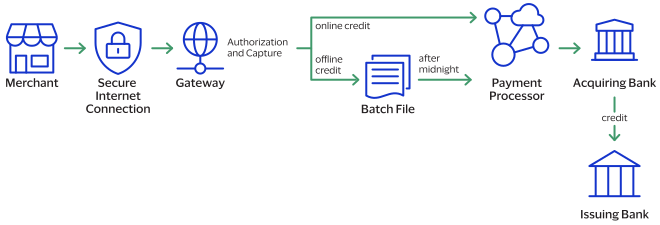
- The merchant sends the refund or credit request toNational Australia Bank.
- For online refunds and credits,National Australia Bankvalidates the order information then sends the request to the payment processor.For offline refunds and credits,National Australia Bankstores the request in a batch file and sends the batch file to the payment processor after midnight.
- The processor validates the request and forwards it to the acquiring bank.
- The acquiring bank transfers funds to the issuing bank.
IMPORTANT
Not all processors support stand-alone credits.