On This Page
Trigger
Trigger UI
This image shows the
Unified Checkout
trigger UI.Figure:
Unified Checkout
Trigger UI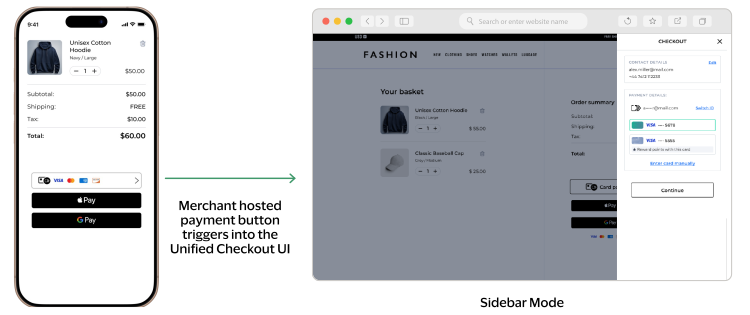
Trigger Integration JavaScript Example
// ============================================================
// TRIGGER API - USAGE GUIDE V2
// ============================================================

// Triggers load the payment UI without displaying the Unified Checkout
// button. Use when a custom event should initiate the payment flow.
// Supported payment types: PANENTRY and CLICKTOPAY only.

// IMPORTANT: Trigger always opens in SIDEBAR mode only.
// The displayMode: 'sidebar' option must be set when creating the trigger.
// The merchant provides their own button/element to launch the payment flow.

// ============================================================
// FLOW 1: AUTO-PROCESSING (autoProcessing: true)
// Mount returns complete payment result
// ============================================================

// Initialize the Unified Checkout client
const client = await window.VAS.UnifiedCheckout(sessionJWT);

// Create trigger — sidebar is the only supported display mode for Trigger
const trigger = client.createTrigger('PANENTRY', {
    displayMode: 'sidebar',
    autoProcessing: true
});

// Mount is called when the merchant's own button is clicked
// This opens the sidebar payment UI and resolves when payment is complete
document.getElementById('your-pay-button').addEventListener('click', async () => {
    const paymentResult = await trigger.mount('#payment-container');
    console.log('Payment complete:', paymentResult);
});

// Clean up
trigger.destroy();


// ============================================================
// FLOW 2: MANUAL COMPLETE (autoProcessing: false)
// Mount returns transient token, then the merchant can manually complete payment
// ============================================================

// Initialize the Unified Checkout client
const client = await window.VAS.UnifiedCheckout(sessionJWT);

// Create trigger with auto-processing disabled
const trigger = client.createTrigger('PANENTRY', {
    displayMode: 'sidebar',
    autoProcessing: false
});

// Mount is called when the merchant's own button is clicked
document.getElementById('your-pay-button').addEventListener('click', async () => {
    const token = await trigger.mount('#payment-container');
    console.log('Received token:', token);

    // Manually complete the payment
    const paymentResult = await trigger.complete(token);
    console.log('Payment complete:', paymentResult);
});

// Clean up
trigger.destroy();


// ============================================================
// FLOW 3: TRANSIENT TOKEN ONLY (autoProcessing: false, no complete)
// Mount returns transient token only — server handles payment authorisation
// ============================================================

// Initialize the Unified Checkout client
const client = await window.VAS.UnifiedCheckout(sessionJWT);

// Create trigger with auto-processing disabled
const trigger = client.createTrigger('PANENTRY', {
    displayMode: 'sidebar',
    autoProcessing: false
});

// Mount is called when the merchant's own button is clicked
document.getElementById('your-pay-button').addEventListener('click', async () => {
    const token = await trigger.mount('#payment-container');
    console.log('Received token:', token);

    // Pass transient token to your server for payment authorisation
    sendToServer(token);
});

// Clean up
trigger.destroy();


// ============================================================
// LIFECYCLE METHODS (available in all flows)
// ============================================================

// Mount - opens the sidebar payment UI (called from merchant's own click handler)
const result = await trigger.mount('#payment-container');

// Unmount - hide the form without destroying it
trigger.unmount();

// Remount - can mount again after unmounting
await trigger.mount('#payment-container');

// Check mounted state
const mounted = trigger.isMounted();  // true or false

// Destroy - permanently destroy the trigger
trigger.destroy();

// Check destroyed state
const destroyed = trigger.isDestroyed();  // true or false


// ============================================================
// EVENT HANDLING (optional for all flows)
// ============================================================

// Subscribe to events
trigger.on('mounted', () => console.log('Sidebar payment UI displayed'));
trigger.on('unmounted', () => console.log('Sidebar payment UI hidden'));
trigger.on('error', (err) => console.error('Trigger error:', err.code, err.message));
trigger.on('destroyed', () => console.log('Trigger destroyed'));


// ============================================================
// SUPPORTED TRIGGER TYPES
// ============================================================

// IMPORTANT: When using createTrigger() for Click to Pay,
// you must create a custom UI. See Click to Pay UI Guidelines.

client.createTrigger('PANENTRY', { displayMode: 'sidebar' });   // Manual card entry
client.createTrigger('CLICKTOPAY', { displayMode: 'sidebar' }); // Click to Pay


// ============================================================
// CAPTURE CONTEXT REQUIREMENT
// ============================================================

// The capture context allowedPaymentTypes must include the payment type
// used in createTrigger(). For PANENTRY, ensure your session request includes:
//
// "allowedPaymentTypes": ["PANENTRY", ...]
//
// Without PANENTRY in allowedPaymentTypes, createTrigger('PANENTRY') will
// fail silently and the sidebar will not open.